Little Wave Machine Manual
Overview
Little Wave Machine is a classic subtractive synthesizer for basses, leads, pads, plucks, and everyday sound design. Three oscillators and a noise generator make the starting sound; two resonant filters shape it, and envelopes, LFOs, and effects bring it to life.
Start with a factory preset, build from INIT - Default, or press Randomize for a new sound. Mutate makes a smaller variation of what you already have. Every result stays editable.
The feature set at a glance:
- Three oscillators. Each morphs from sine through saw to square, with independent tuning, Fat, and Mix.
- Noise. Blend white, pink, and filtered noise, with its own attack, decay, and highpass filter.
- Two filters. Twelve responses and six saturation characters per filter, with independent cutoff envelopes and a choice of single, parallel, or serial routing.
- Analog character. Drift adds pitch wander, Phase Rnd varies the start of each note, and Unison thickens all three oscillators.
- Four LFOs. Ten waveforms, including four random shapes, with tempo sync and note-triggered modes on LFOs 1 and 2.
- Four modulation envelopes. Two full ADSRs and two simpler attack/release envelopes, each with its own destination and bipolar depth.
- Performance. Up to 16 voices, Mono with last-note priority, Slide between overlapping notes, and an adjustable pitch bend range.
- Arpeggiator. Chord expansion, pitch patterns, rhythms, octave range, gate, and latch turn held notes into phrases.
- Effects. Chorus, flanger, or phaser, followed by delay, grit, and seven reverb modes.
- EQ. Low and high shelves, two parametric mid bands, and low and high cuts shape the sound after the effects.
- Presets. 106 factory sounds plus a User bank for your own patches, including their arp settings.
- Built-in help. The strip below the controls shows values and descriptions as you edit.
- Three themes. Furia Rossa, Dark, and Light share the same controls and layout.
The preset bar stays across the top. Below it, seven tabs run from left to right: Oscillators, Filters, FX, EQ, LFOs, Envelopes, and Settings. Each tab has a central display showing the part of the sound you are editing.
The Preset Bar
The controls across the top are available on every tab.
- Randomize: creates a new sound.
- Mutate: makes a smaller variation of the current sound.
- < and >: load the previous or next preset through the System bank and then the User bank, wrapping around at the ends.
- Preset: opens the preset browser, with System and User pills for the factory bank and your own sounds.
- Save: opens a name field and Save As to store the current sound as a new User preset.
- Edit: replaces Save when a User preset is selected and adds Overwrite and Delete to the save dialog.
Both buttons preserve your EQ, arp setup, and Settings play aids, including Mono and Slide. Save a sound you want to keep before exploring further.
Browsing and saving
Factory presets are grouped as Init, Bass, Lead, Pad, Pluck, Keys, Organ, Brass, Bell, Arp, Drone, Percussion, and FX. INIT - Default provides a clean starting point. Only the factory ARP category loads with Arp enabled; the other sounds include arp settings you can enable yourself.
In the open browser, point at a preset or use Up and Down to highlight it, then select it or press Return to load. Left and Right switch banks. Escape or a click outside closes the browser. Scrolling the list by touch does not load the sounds you pass over.
Save As always creates a new preset, even if its name matches another. Overwrite replaces the selected User preset with the current sound and uses the name in the field, so it can rename the preset too. Return in the name field uses Save As. Cancel closes the dialog without saving.
Delete asks for confirmation before permanently removing a User preset. Deleting leaves the current sound playing and clears the preset selection. Factory presets cannot be overwritten or deleted.
Oscillators
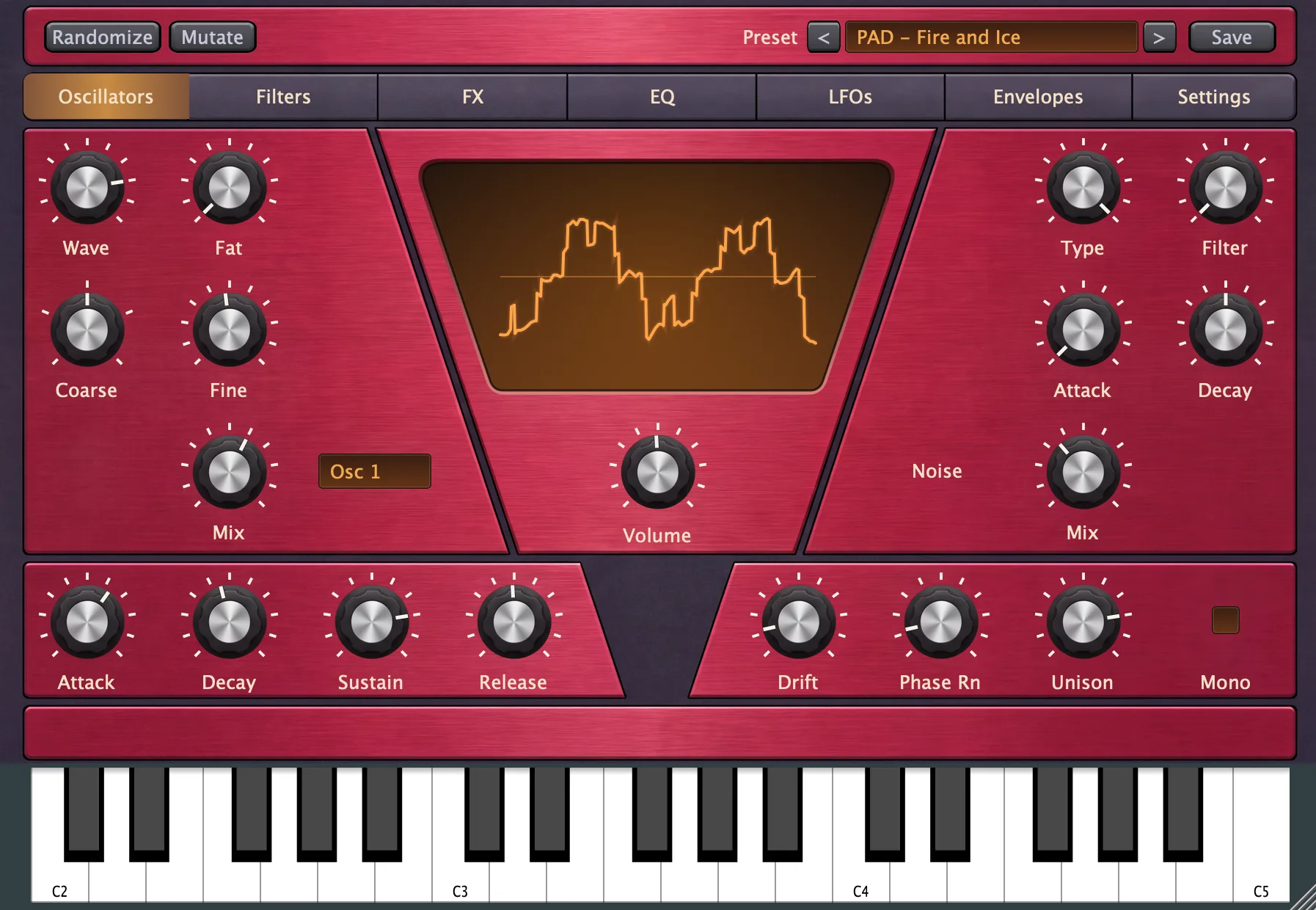
The upper left panel edits one of the three oscillators. Noise occupies the upper right. The lower panels hold the amplitude envelope and analog character controls, with Volume beneath the central display.
Oscillator controls
Use the Osc 1 / Osc 2 / Osc 3 selector to choose the oscillator to edit. All three continue sounding according to their Mix settings, whether selected or not.
- Wave: morphs from sine at the left through saw in the center to square at the right, with continuous blends between them.
- Fat: adds detuned copies to this oscillator for a thicker sound, with more unstable tuning at high settings.
- Coarse: shifts this oscillator by -24 to +24 semitones, in semitone steps.
- Fine: shifts this oscillator by -100 to +100 cents, where 100 cents is one semitone.
- Mix: sets how much this oscillator contributes, from silent to full level.
Coarse sets intervals between oscillators; Fine creates slower beating between nearly matching pitches. The Octave dial in Settings transposes all three together.
Noise
- Type: morphs from bright white noise through darker pink noise to a focused band of noise.
- Filter: removes low frequencies from the noise, leaving progressively thinner hiss as you turn it up.
- Attack: sets the noise fade-in time, from 0 to 2 seconds.
- Decay: sets the noise fade-out time up to 2 seconds, with the maximum setting sustaining the noise instead of letting it decay.
- Mix: blends noise into the oscillator sound.
Noise has its own attack and decay but still passes through the voice's filters and amplitude envelope. A short noise decay adds a burst to the start of a pitched note; sustained noise can add breath or a continuous layer.
Amplitude envelope
The lower left ADSR controls the volume of each note before the effects.
- Attack: sets how quickly a note rises to full volume, from 0 to 2 seconds.
- Decay: sets how quickly it falls from the peak to Sustain, from 1 millisecond to 5 seconds.
- Sustain: sets the level held while the key remains down, from 0% to 100%.
- Release: sets the fade after key-up, up to 5 seconds, with a short minimum fade to soften the end of a note.
A low Sustain with a short Decay makes a pluck. A high Sustain and long Attack make a swelling sound. Release begins from the level reached when you let go, including if the note is still attacking. Changes to an envelope already in release take effect on the next note.
Analog character and Mono
- Drift: adds slow pitch wander to the oscillators.
- Phase Rnd: varies each note's starting position in the waveform, so repeated notes differ.
- Unison: thickens all three oscillators with gentle detuning, in addition to their individual Fat settings.
- Mono: plays one note at a time with last-note priority and preserves envelopes across overlapping keys.
In Mono, releasing the newest key returns to the newest one still held. Sustain pedal is supported. Overlapping notes can slide using Settings' Slide dial; separate notes start their envelopes again. Switching Mono on or off keeps the current note running without restarting its envelopes.
Volume and display
Volume beneath this display sets the sound level before FX. It affects how hard the sound drives Grit and the other effects. The Volume on FX, EQ, and Settings is a separate final output control after effects and EQ.
The display combines all three oscillators and noise into one animated waveform. It illustrates the waveform blend, tuning, Fat, and analog movement; some motion is exaggerated to make small differences visible.
Filters
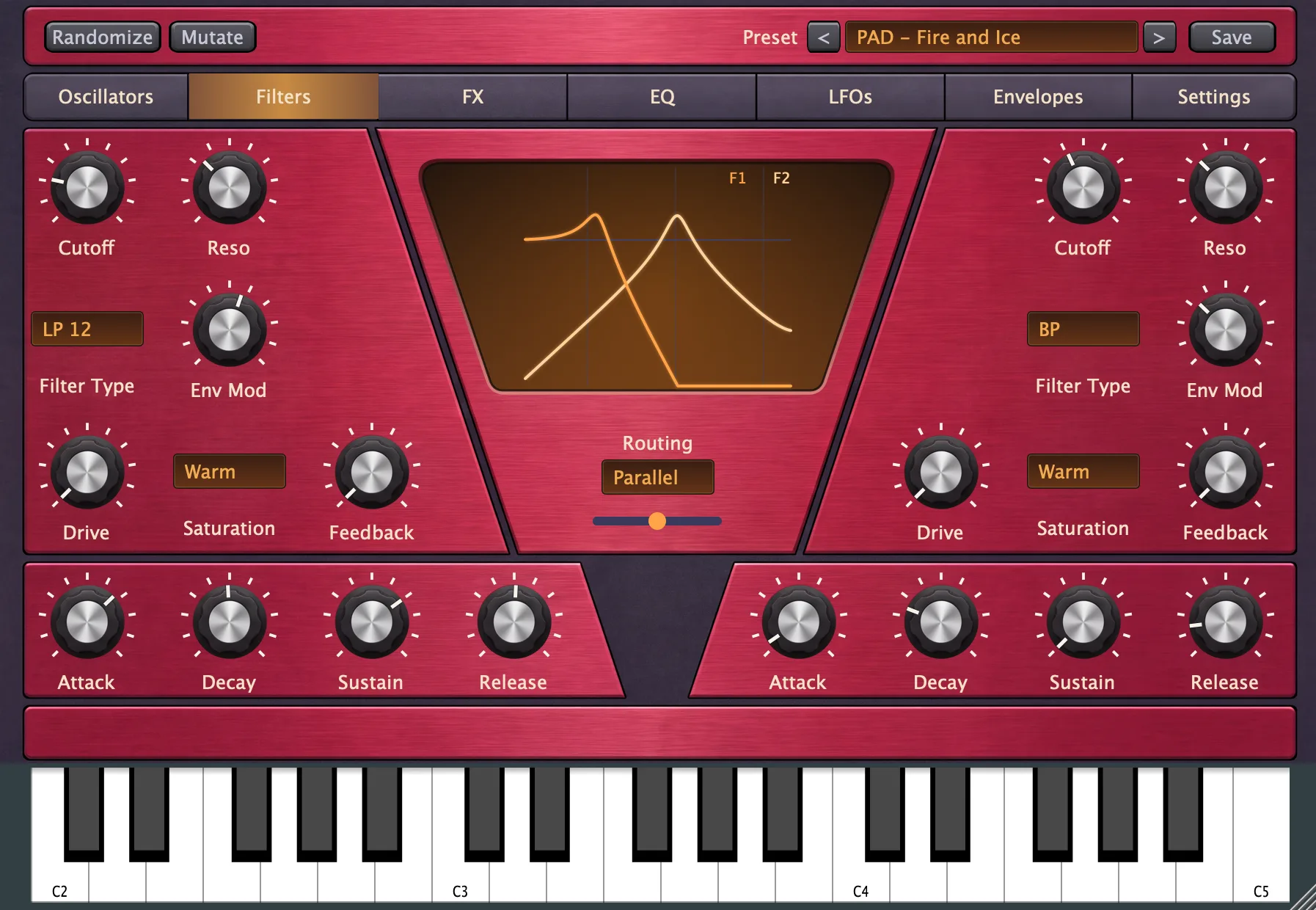
Filter 1 occupies the left panels and Filter 2 the right. Each has the same controls and its own cutoff envelope. Routing beneath the display decides how they combine.
Filter controls
- Cutoff: sets the filter's working frequency from 20 Hz to 20 kHz, with higher values making a lowpass sound brighter.
- Reso: sets resonance from 0 to 1.5, with the response depending on Filter Type.
- Filter Type: chooses the response, from lowpass slopes to bandpass, highpass, notch, and comb.
- Env Mod: sets the cutoff envelope span from zero to seven octaves.
- Drive: sets the intensity of the selected saturation character, with saturation off at zero.
- Saturation: chooses the distortion character for this filter.
- Feedback: adds feedback character, extends TPT ringing, or increases Comb feedback, depending on Filter Type.
Filter Type
- 6 dB Lowpass: a gentle one-pole low-pass with an added resonant band-pass. Reso sets the peak amount and Feedback sharpens its ringing, without self-oscillation.
- 12 dB Lowpass: removes highs with a steeper but still gentle slope.
- 24 dB Lowpass: removes highs with a steep slope.
- 36 dB Lowpass: removes highs with the steepest slope.
- TPT 12 dB: the resonant low-pass core from LAM's audition synth, with a gentle slope and clear ringing.
- Ladder 12 dB: a nonlinear ladder with a gentler output slope and internal drive.
- Ladder 24 dB: the same ladder with a steeper output slope.
- Diode 18 dB: a three-stage diode-inspired character model for squelchy sounds.
- Bandpass: keeps a band around Cutoff and removes frequencies on either side.
- Highpass: removes frequencies below Cutoff.
- Notch: removes a band around Cutoff while keeping the frequencies above and below it.
- Comb: creates peaks and dips with a tuned delay; Cutoff sets their spacing in Hz and Reso/Feedback set the ringing.
The ladder and diode modes are character approximations, not emulations of specific instruments. Drive pushes their internal stages as well as the selected output saturation. TPT uses output saturation only. The standard resonant modes can self-oscillate above Reso 1; TPT instead has a finite Q range, and Comb feedback stays below unity. The standard and TPT 12 dB modes have a mild resonance bump even at Reso zero.
Filter 1 also stores an Accent amount, available through host automation. Above half velocity, it adds envelope sweep and a little resonance; zero disables the added response. There is no separate Accent dial on the filter panel.
Saturation
- Warm: adds soft asymmetric clipping and even harmonics.
- Tube: adds compression and mild asymmetry through two shaping stages.
- Hard: adds asymmetric hard clipping with subtle digital grit.
- Fold: folds waveform peaks back on themselves for metallic harmonics.
- Rectify: blends in full-wave rectification for an octave buzz.
- Crush: reduces resolution for coarse digital distortion that grows stronger with Drive.
Filter envelopes
The ADSR beneath each filter moves that filter's cutoff by the amount set with Env Mod.
- Attack: sets how quickly the sweep rises, from 0 to 2 seconds.
- Decay: sets how quickly it falls to Sustain, from 1 millisecond to 5 seconds.
- Sustain: sets the sweep level held while the key is down, from 0% to 100%.
- Release: sets how quickly the sweep returns after key-up, from 0 to 5 seconds.
For a short bright attack that becomes darker, choose a lowpass response, lower Cutoff, raise Env Mod, and use a short Decay with low Sustain. The amplitude envelope must leave the note audible long enough to hear the sweep.
Routing and Filter Mix
- Filter 1 only: uses Filter 1 and its saturation.
- Filter 2 only: uses Filter 2 and its saturation.
- Parallel: sends the sound through both filters separately and blends their outputs.
- Serial: sends the sound through Filter 1 and then Filter 2, followed by their saturation stages.
- Off: bypasses both filters and their saturation.
- Filter Mix: appears for Parallel and balances Filter 1 against Filter 2, with feedback showing the percentage of each.
The central display calculates the active filter response from its base settings, using a small-signal approximation for nonlinear modes. It shows separate curves for Parallel and a combined curve for Serial. This is a guide to the filter shape rather than a measurement of its distortion or live envelope sweep.
FX
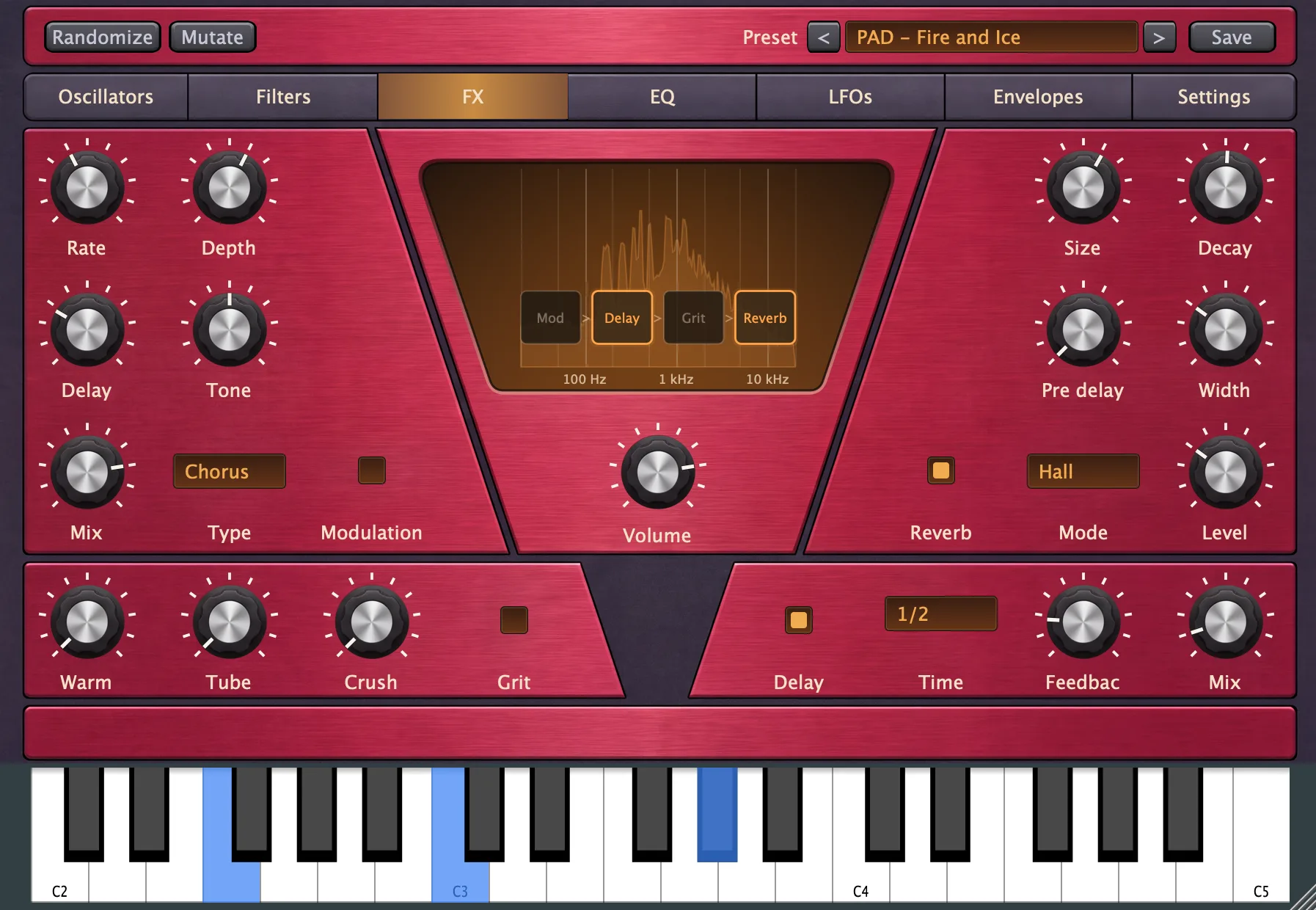
Modulation sits upper left, Reverb upper right, Grit lower left, and Delay lower right. The processing order is Modulation > Delay > Grit > Reverb > EQ > final Volume, followed by a fixed safety limiter.
Each effect has its own enable switch. The central display shows the four FX stages over a live spectrum of the final output. Select a stage box in the display to toggle that effect; enabled stages glow.
Modulation
- Rate: sets the sweep speed from 0.01 to 3 Hz for Chorus and Flanger, or 0.01 to 10 Hz for Phaser.
- Depth: sets how far the sweep travels.
- Delay: appears for Chorus and sets the spacing of its voices, with longer settings moving toward a doubling effect.
- Feedback: replaces Delay for Flanger and Phaser and makes their sweep sharper and more resonant.
- Tone: darkens the effect to the left or brightens it to the right, with a neutral center and no change to the dry sound.
- Mix: blends the effect with the dry sound.
- Type: selects Chorus for detuned thickness and width, Flanger for a sweeping short-delay sound, or Phaser for sweeping notches.
- Modulation switch: enables or bypasses the section while keeping its settings.
Reverb
- Size: sets the apparent size of the space.
- Decay: shapes the tail's damping and character, rather than setting a duration in seconds.
- Pre delay: delays the reverb input by 0 to 200 milliseconds, separating the initial note from the ambience.
- Width: sets stereo width in Hall, Room, Plate, and Bright modes, from mono to full stereo.
- Amount: replaces Width in Shimmer mode and controls octave-up feedback into the tail.
- Ducking: replaces Width in Ducked mode and sets how strongly the wet return falls while notes sound.
- Hold: replaces Width in Gated mode and sets the gate's hold time from 20 to 500 milliseconds.
- Mode: chooses the reverb character.
- Level: sets the reverb return level while leaving the dry signal's level unchanged.
- Reverb switch: enables or bypasses reverb, clearing its tail when bypassed.
The last dial changes with Mode, so only the relevant Width, Amount, Ducking, or Hold control is shown.
- Hall: a spacious general-purpose ambience.
- Room: a smaller space with stronger damping.
- Plate: a medium space with a lighter, more present tail.
- Bright: a bright tail with low frequencies removed from the return.
- Shimmer: feeds an octave-up version of the tail back into the reverb.
- Ducked: lowers the return while you play and lets it rise in the gaps.
- Gated: holds the ambience open after the input falls quiet, then closes it.
Grit
- Warm: adds soft saturation and body.
- Tube: adds harder, grittier drive.
- Crush: reduces bit depth and sample rate together, with both reductions off at zero.
- Grit switch: enables or bypasses the section while keeping its settings.
Warm, Tube, and Crush can work together. Grit processes the combined sound after Delay, so it colors echoes as well as the notes feeding them.
Delay
- Delay switch: enables or bypasses echoes, clearing stored repeats when bypassed.
- Time: sets echo spacing from 1/16 triplets to a whole note, including straight, dotted, and triplet choices.
- Feedback: sets how much of each echo feeds back for another repeat, up to 95%.
- Mix: blends the echoes with the dry sound.
A dot after a note value means dotted; T means triplet. Plugins follow host tempo, while standalone uses the Tempo dial in Settings.
Final Volume
Volume beneath the display sets the final level after all effects and EQ. It is the same control shown on EQ and Settings, so changing it on one tab updates the others. Feedback reads in dB and shows Mute at zero.
A fixed safety limiter follows this control and reduces excessive output peaks. It has no controls or meter. Lower final Volume if a patch is too loud; lower the Oscillators tab's Volume to change how hard the sound hits the effects.
EQ
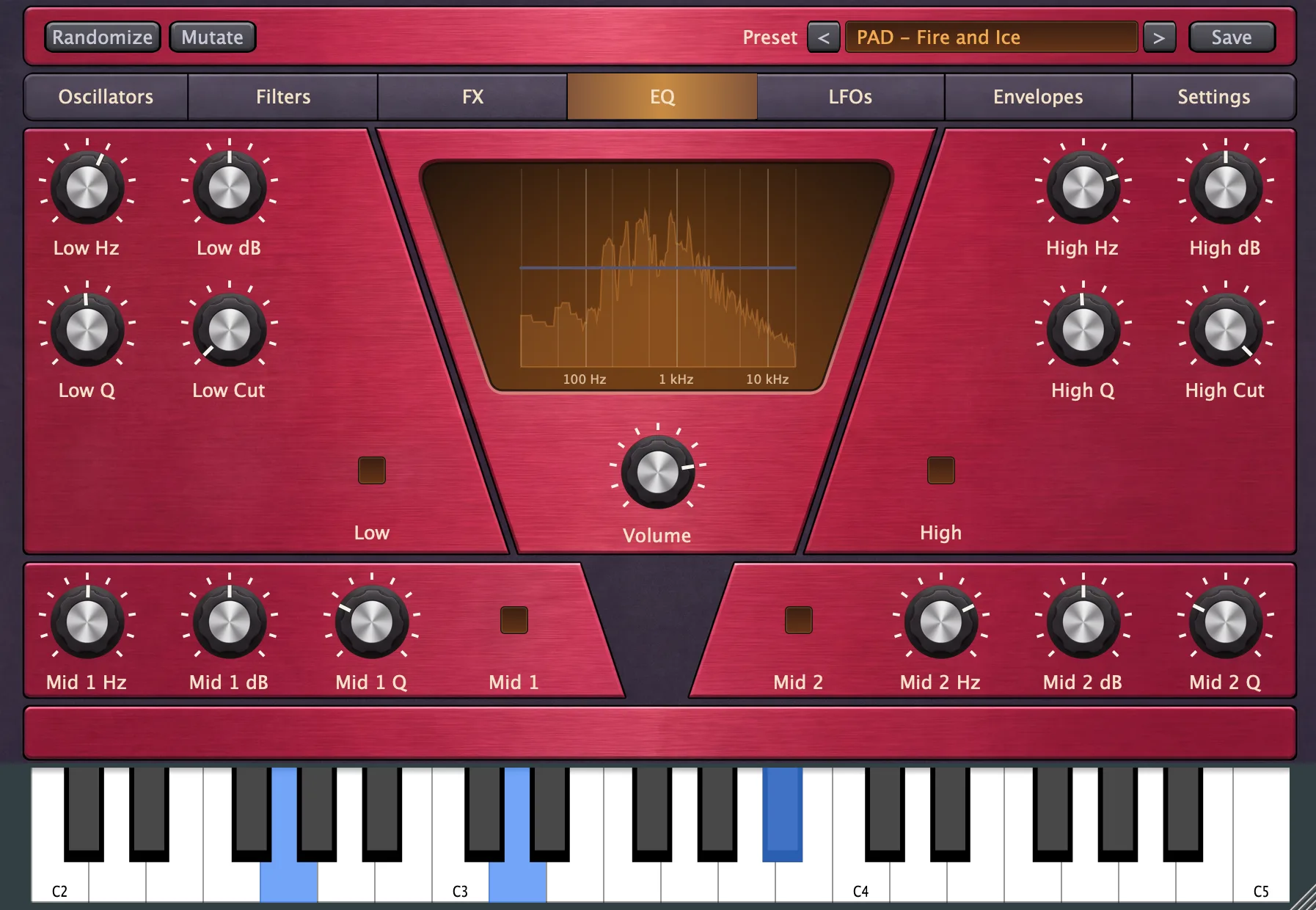
EQ shapes the full sound after FX, including delay repeats and reverb tails. Low and High occupy the upper panels, with Mid 1 and Mid 2 below. Each section has its own enable switch, and its values remain stored while bypassed.
Low
- Low Hz: sets the shelf frequency from 40 to 500 Hz.
- Low dB: boosts or cuts the lows by up to 15 dB.
- Low Q: shapes the shelf transition from 0.3 to 2.0, with higher settings adding a resonant bump near the shelf frequency.
- Low Cut: removes frequencies below its setting, from 20 Hz to 1 kHz, with the minimum position turning the cut off.
- Low switch: enables the low shelf and Low Cut together.
High
- High Hz: sets the shelf frequency from 1 to 18 kHz.
- High dB: boosts or cuts the highs by up to 15 dB.
- High Q: shapes the shelf transition from 0.3 to 2.0, with higher settings adding a resonant bump near the shelf frequency.
- High Cut: removes frequencies above its setting, from 1 to 20 kHz, with the maximum position turning the cut off.
- High switch: enables the high shelf and High Cut together.
Mid 1 and Mid 2
Both mid bands have the same controls and operate independently.
- Mid 1 / Mid 2 switch: enables or bypasses that mid band.
- Mid 1 Hz / Mid 2 Hz: sets the center frequency from 200 Hz to 8 kHz.
- Mid 1 dB / Mid 2 dB: boosts or cuts around the center frequency by up to 15 dB.
- Mid 1 Q / Mid 2 Q: sets the width from 0.3 to 6.0, with low values broad and high values narrow.
Display and Volume
The display overlays the combined EQ response on a live spectrum of the final output. The response includes the active shelves, both mid bands, cuts, and their Q settings. The spectrum shows the sound after processing.
Volume beneath the display is the shared final output control described in FX. EQ settings save with presets and stay unchanged by Randomize and Mutate.
LFOs
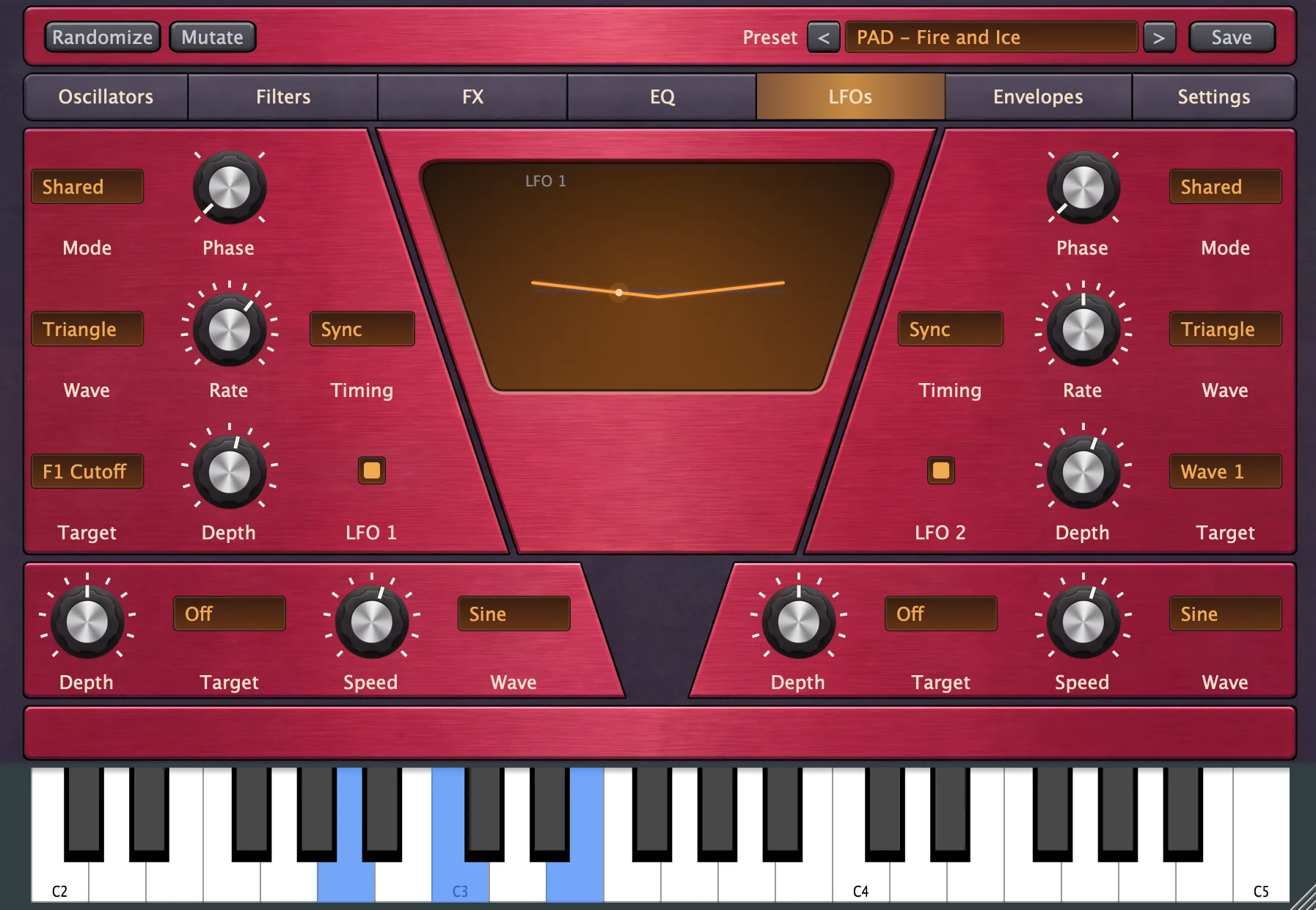
An LFO moves a control repeatedly. LFOs 1 and 2 occupy the upper panels and have full timing and playback options. LFOs 3 and 4 occupy the lower panels and provide simpler continuous movement. Each LFO has one Target and its own Depth.
LFOs 1 and 2
- Phase: chooses the cycle's starting position at 0, 90, 180, or 270 degrees, with the random shapes ignoring this setting.
- Mode: chooses whether the LFO runs continuously, restarts on notes, plays once, fades out, or rises in.
- Free / Sync: chooses independent speed in Hz or a tempo-based cycle length.
- Speed / Rate: sets 0.05 to 10 Hz in Free, or a cycle length from 1/16 to 16/1 in Sync, with clockwise rotation always making movement faster.
- Wave: chooses the shape of the movement.
- Depth: sets the modulation amount from -100% to +100%, with zero in the center and negative values reversing the movement.
- Target: chooses the control to move, with Off disabling the destination.
- Enable switch: turns modulation on or off while preserving Depth and the other settings.
Sync rates describe fractions or multiples of a four-beat bar: 1/1 is one bar and 1/16 is one sixteenth of that bar. Available cycle lengths are 1/16, 1/8, 1/4, 1/3, 1/2, 3/4, 1/1, 3/2, 2/1, 3/1, 4/1, 6/1, 8/1, 12/1, and 16/1. Plugins use host tempo and standalone uses Settings' Tempo.
Wave
- Sine: moves smoothly above and below the center.
- Triangle: falls and rises in straight lines.
- Ramp Up: rises steadily, then jumps back down.
- Ramp Down: falls steadily, then jumps back up.
- Square: switches between high and low levels.
- Sample & Hold: chooses a random level each cycle and holds it.
- Random Ramp: moves in a straight line to a new random level each cycle.
- Smooth Random: curves smoothly between random levels.
- Drift: wanders in small random movements, tending back toward the center.
- Impulse: makes four quick swings that fade and restart each cycle.
Mode
- Shared: runs one continuous LFO across all notes, with new notes joining its current position.
- Retrigger: restarts on each note and loops while it plays.
- One Shot: runs one cycle per note, then holds its end position.
- Fade 1x / Fade 2x / Fade 4x / Fade 8x: restart on each note and reduce modulation to zero over one, two, four, or eight cycles.
- Rise 4x: restarts on each note and increases modulation over four cycles, then keeps full depth.
LFOs 3 and 4
The lower LFOs expose Depth, Target, Speed, and Wave. They always run Free from 0.05 to 10 Hz, in Shared mode with phase zero. Set Depth to zero or Target to Off to stop their influence.
Display and destinations
Select anywhere within an LFO panel to show that LFO in the central display. Selecting the display cycles through the four LFOs. Periodic shapes show one cycle with a moving dot; random shapes show upcoming movement scrolling past a fixed dot. The display follows the newest playing voice and keeps an illustrative clock moving between notes, even at zero Depth or while bypassed.
LFOs and modulation envelopes use the same Target list. The targets follow the sound sections:
- Oscillators and Noise: waveform, tuning, Fat, Mix, noise color, filter, and envelope times.
- Amp, Analog, and Global: amplitude ADSR, Drift, Phase, Unison, Octave, and the volume before FX.
- Filters: type, cutoff, resonance, feedback, drive, saturation, envelope amount, ADSR, and the parallel Filter Mix.
- FX: modulation rate, depth, feedback, mix, tone, and chorus delay, delay feedback and mix, Grit controls, and continuous reverb controls.
- EQ: shelf and mid frequencies, gains, Q values, and both cuts.
Modulation adds to the destination's own setting. Filter Type, Saturation, and Octave move in discrete steps. A bypassed section stays bypassed, and mode-specific targets act only when their mode is active, such as Reverb Amount in Shimmer. The FX target named Reverb Mix controls the panel's Reverb Level.
Effects exist once for the whole sound. Shared LFOs keep moving them through tails even without held notes; note-triggered LFOs and modulation envelopes contribute an average across active voices, so playing a larger chord does not multiply the effect modulation.
Envelopes
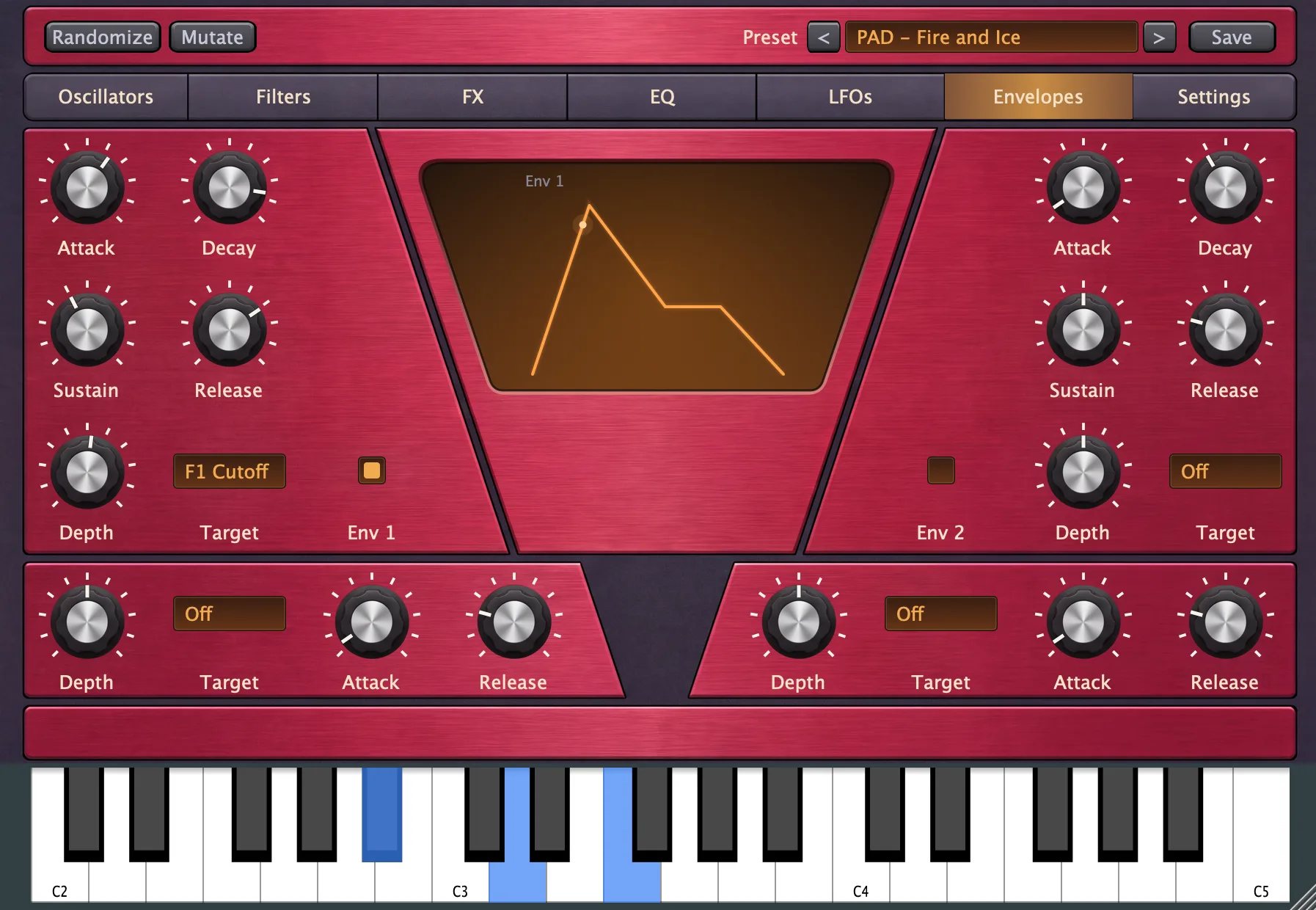
These four envelopes move chosen targets on every note. They are separate from the amplitude envelope on Oscillators and the two filter envelopes on Filters. Envelopes 1 and 2 have full ADSR controls above; Envelopes 3 and 4 use simpler attack/release controls below.
Envelopes 1 and 2
- Attack: sets the rise from zero to full envelope strength, from 0 to 2 seconds.
- Decay: sets the fall from the peak to Sustain, from 0 to 2 seconds.
- Sustain: sets the strength held while the note plays, from 0% to 100%.
- Release: sets the return to zero after key-up, from 0 to 2 seconds.
- Depth: sets how far the envelope moves its Target, from -100% to +100%, with zero in the center.
- Target: chooses the destination from the same list as the LFOs.
- Enable switch: turns this envelope's influence on or off while preserving its settings.
Positive Depth pushes the target upward as the envelope rises; negative Depth pushes it downward. The target's own dial sets the starting point. For example, aim a short envelope at Osc 1 Fine for a pitch movement at the start of each note.
Envelopes 3 and 4
The lower envelopes expose Depth, Target, Attack, and Release. They rise to full strength, hold there while the note plays, and return to zero after key-up. Sustain is fixed at 100% and there is no decay stage. Set Depth to zero or Target to Off to stop their influence.
Display and playback
Select anywhere in an envelope panel to show it in the display; selecting the display cycles envelopes. A dot follows the newest voice's actual stage and level. Between notes, the curve stays visible without a moving dot.
Envelopes keep advancing at zero Depth and while bypassed, so enabling one during a held note joins its current position. Release starts from the current level at key-up. Parameter changes during an existing release are deferred until the next note.
Settings
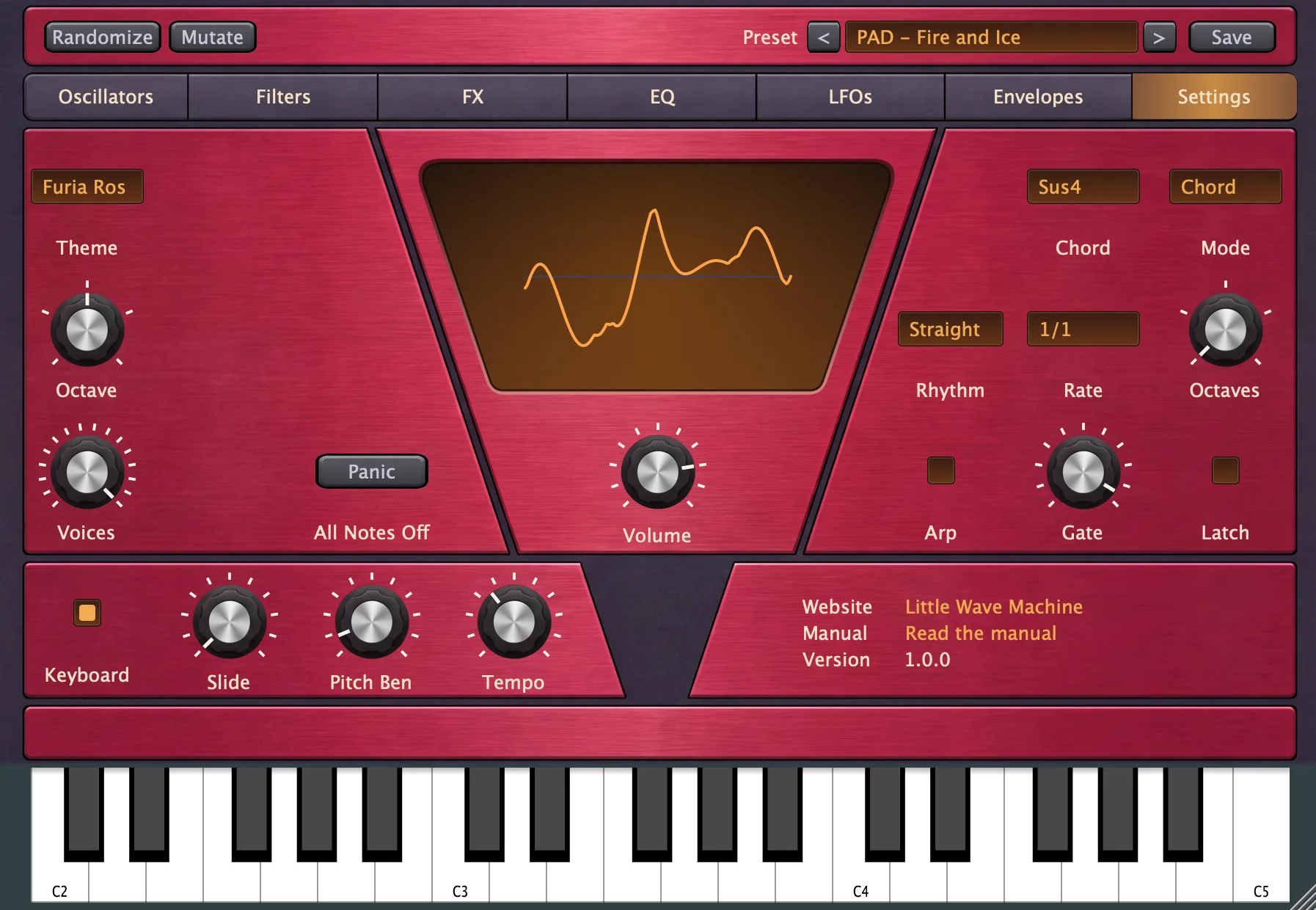
The left panels hold appearance and playing controls. The right panels hold the arp and product links. The central display is a live strobe view of the newest playing voice.
Appearance and playing controls
- Theme: selects Furia Rossa, Dark, or Light, with Furia Rossa used on a fresh start and your choice remembered independently of presets.
- Octave: transposes all three oscillators from two octaves down to two up and saves with the sound.
- Voices: limits polyphony from 1 to 16, default 16, and stays unchanged by preset loads.
- Panic: under All Notes Off, immediately stops notes and effect tails and clears held and latched notes.
- Keyboard: in standalone, shows or hides the on-screen keyboard below the messaging strip, expanding the window when shown.
- Slide: sets the pitch glide between overlapping Mono notes from 0 to 2000 milliseconds, with zero changing pitch immediately.
- Pitch Bend: sets wheel travel from 0 to 24 semitones in either direction, default 2, with zero disabling pitch bend.
- Tempo: in standalone, sets 20 to 300 BPM, default 120, for the arp, synced LFOs, delay, and strobe clock.
Mono is enabled on the Oscillators tab. Slide affects overlapping Mono notes only; polyphonic notes do not slide. Voices controls CPU use and is remembered across sessions and standalone restarts. Reducing the voice limit stops voices outside the new budget.
The standalone keyboard starts visible and remains available across tabs. Tempo stays unchanged when you load presets and is remembered between standalone launches. Plugins use host MIDI and tempo and omit the local Keyboard and Tempo controls. Octave, Slide, and Pitch Bend save with presets.
Arp
The arp takes notes from your MIDI input or the standalone keyboard, expands them using Chord, and plays the resulting pool using Mode and Rhythm.
- Arp switch: enables chord and arp processing, with bypass passing your original notes through and ignoring Chord and Latch.
- Chord: chooses Single Note, Octave, Power, Minor, Major, 7th, Sus4, Open, Bass & Minor, or Bass & Major for each input note.
- Mode: chooses sustained input notes, repeated chords, or a pitch order for the expanded note pool.
- Rhythm: chooses the pattern of hits, rests, accents, and swing independently of the pitch pattern.
- Rate: sets the step length to 1/32, 1/16, 1/8, 1/4, 1/2, or 1/1.
- Octaves: extends the pattern across 1 to 5 octaves.
- Gate: sets note length from 1% to 100% of each step, default 50%.
- Latch: keeps notes playing after you release the input keys.
All eight settings save with presets and host projects. They are available in hosted and standalone use, but are not host automation parameters. The arp follows tempo and starts from your input notes; its phase is not aligned to the host song position.
Single Note uses the input pitch alone. Octave adds the octave above; Power adds the fifth and octave. Minor and Major build triads, 7th builds a dominant seventh chord, and Sus4 uses root, fourth, and fifth. Open spreads root, fifth, octave, and the major third above that octave. Bass & Minor and Bass & Major add a root one octave below their triad. Playing several keys combines their chord tones into one pool without duplicate pitches.
Mode
- Off: holds the input pitches without chord expansion or repeated steps, while Latch can still hold them.
- Chord: repeats all tones together on every hit.
- Up: plays tones from low to high.
- Down: plays tones from high to low.
- Up/Down: alternates ascending and descending passes.
- Down/Up: alternates descending and ascending passes.
- Double Up: repeats each tone twice while ascending.
- Double Down: repeats each tone twice while descending.
- Outside In: alternates the lowest and highest remaining tones, working inward.
- Inside Out: starts in the middle and works outward.
- Bass Alternate: returns to the lowest tone between ascending upper tones.
- Top Alternate: returns to the highest tone between descending lower tones.
- Random: chooses tones in a random order.
Rhythm
Rate sets the length of each rhythm step. Most rhythms have eight steps; the shorter cycles repeat after their own length. Rests pause the pitch pattern, so the next hit takes the next tone rather than skipping it.
- Straight: plays every step at the input velocity.
- Swing: plays every step with a 60/40 split inside each pair.
- 3 Steps: repeats
x-x, with two hits over three steps. - 5 Steps: repeats
x--x-, grouping five steps as 3 + 2. - 6 Steps: repeats
x--x--, grouping six steps as 3 + 3. - 7 Steps: repeats
x--x-x-, grouping seven steps as 3 + 2 + 2. - Charleston: repeats
x--x----across eight steps. - Two Hits: repeats
--x---x-across eight steps. - Late Hit: repeats
x--x---xacross eight steps. - Cinquillo: repeats
x-xx-xx-across eight steps. - Galloping: repeats
x-xxx-xxacross eight steps. - Offbeat Accents: emphasizes alternate steps.
- Tresillo Accents: emphasizes steps 1, 4, and 7.
- Syncopated Accents: combines accents with syncopated rests.
- Swing with Rests: adds rests to the 60/40 swing timing.
In the written patterns, x means a hit and - a rest. The plain hit/rest patterns use the input velocity throughout; accented patterns keep accented hits at the input velocity and lower other hits to 72% of it.
Gate, Latch, and Mono slides
Below 100% Gate, consecutive notes have a gap and retrigger. At 100%, consecutive hits connect: with Mono enabled and Slide above zero, the phrase can glide between pitches. Repeated pitches stay held. A rhythm rest breaks the connection and the following note starts a new phrase.
With Latch enabled, notes remain in the pool after key-up. Playing a fresh key after releasing the previous keys replaces the latched input; keys held together form a group. Panic stops the phrase and clears that pool. Switching Arp off also clears latched notes, so switching it back on needs a new note unless a key is still physically held.
Product information and output
- Website: opens the Little Wave Machine product page in your browser.
- Manual: opens the online manual in your browser.
- Version: shows the installed build version.
- Volume: controls the same final output level shown on FX and EQ.
iPhone display
Turn the iPhone sideways for the desktop arrangement. Portrait uses a compact four-panel layout with a tab dropdown and previous/next arrows, without the central visualization. The standalone portrait keyboard has two octaves plus the closing C. Dark and Light use their standard background colors, while Furia Rossa uses red.
On Filters, the 6 dB low-pass supports Reso and Feedback in both portrait and landscape.